GStreamer RTSP 播放 UDP/TCP 选择
采用 rtspsrc 播放 RTSP 时可以选择 UDP 或 TCP。
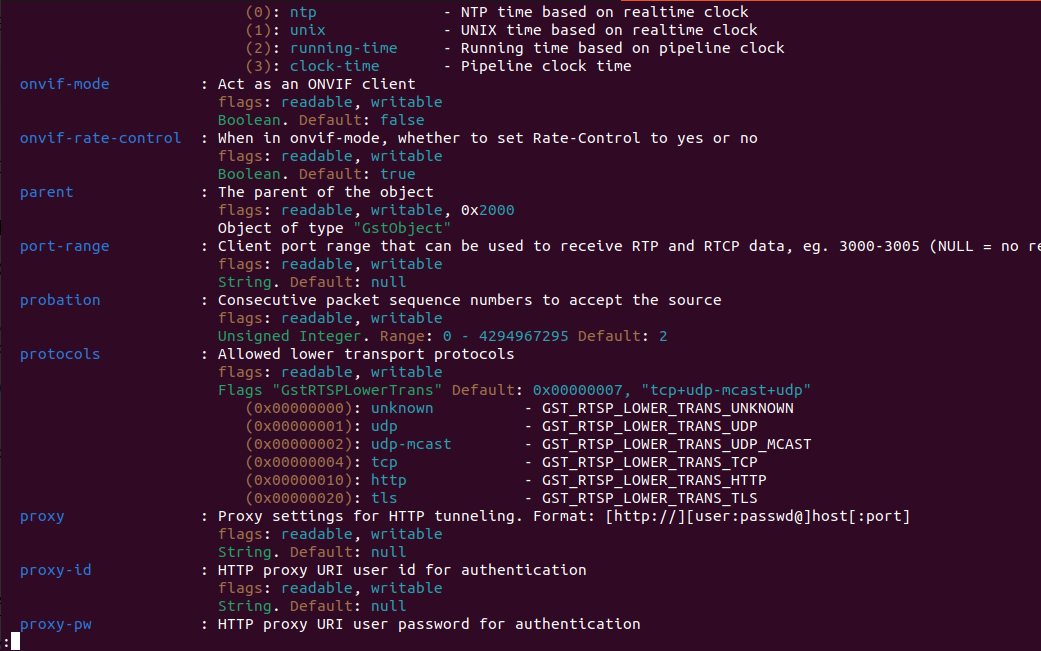
其中看到属性部分:
  protocols           : Allowed lower transport protocols
                        flags: readable, writable
                        Flags "GstRTSPLowerTrans" Default: 0x00000007, "tcp+udp-mcast+udp"
                           (0x00000000): unknown          - GST_RTSP_LOWER_TRANS_UNKNOWN
                           (0x00000001): udp              - GST_RTSP_LOWER_TRANS_UDP
                           (0x00000002): udp-mcast        - GST_RTSP_LOWER_TRANS_UDP_MCAST
                           (0x00000004): tcp              - GST_RTSP_LOWER_TRANS_TCP
                           (0x00000010): http             - GST_RTSP_LOWER_TRANS_HTTP
                           (0x00000020): tls              - GST_RTSP_LOWER_TRANS_TLS
protocols可以选择多种协议!
代码实现:
# 设置 UDP
g_object_set(rtspsrc, "protocols", "udp", NULL);

# 设置 TCP
g_object_set(rtspsrc, "protocols", "tcp", NULL);
# 命令中如何去测试
# RTSP 流默认使用 UDP,若需切换到 TCP,可以设置 rtspsrc 的 protocols 参数:

gst-launch-1.0 rtspsrc location=rtsp://<your_rtsp_server>/stream protocols=tcp ! decodebin ! videoconvert ! autovideosink

gst-launch-1.0 rtspsrc location=rtsp://<your_rtsp_server>/stream protocols=udp ! decodebin ! videoconvert ! autovideosink
高级功能(可选)
1. 指定 UDP/TCP 传输方式
RTSP 流默认使用 UDP,若需切换到 TCP,可以设置 rtspsrc 的 protocols 参数:
gst-launch-1.0 rtspsrc location=rtsp://<your_rtsp_server>/stream protocols=tcp ! decodebin ! videoconvert ! autovideosink
2. 控制缓冲区大小
增加或减少缓冲区大小以调整延迟:
gst-launch-1.0 rtspsrc location=rtsp://<your_rtsp_server>/stream latency=200 ! decodebin ! videoconvert ! autovideosink
latency参数设置缓冲区的延迟时间,单位为毫秒。